
Store your airline frequent flier, hotel loyalty account and car rental account numbers in your Profile so AmTrav will automatically add them to every booking.
AmTrav lets you save your loyalty program information in your Profile like your frequent flyer numbers, hotel rewards and car rental account numbers so that they'll be automatically applied to your bookings and you'll automatically earn points. Here’s how to add your loyalty numbers:
Note: add your loyalty account information to your Profile before you book, if you need to add a loyalty account to an existing booking, please contact an AmTrav Travel Advisor.
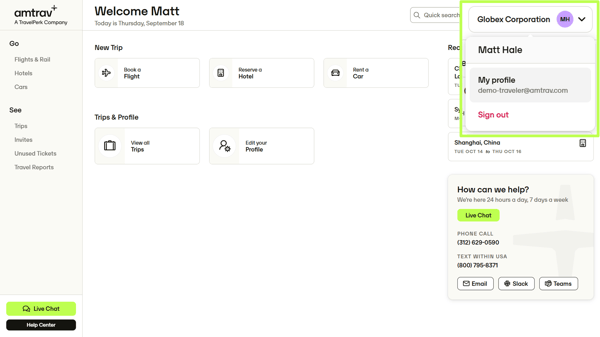
Step 1: Click on My Profile in the dropdown in the upper righthand corner:
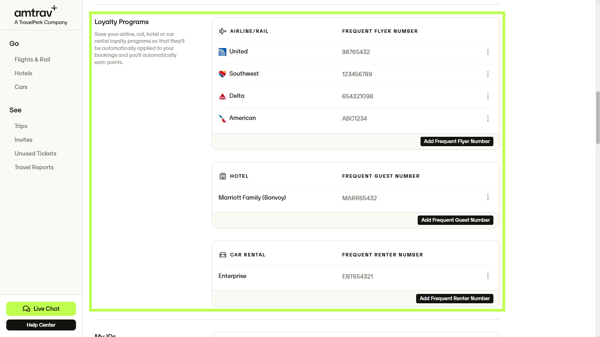
Step 2: Scroll down to the Loyalty Programs section. You will have the option to enter loyalty numbers for most airline, hotel, or car rental companies by clicking on the “Add Frequent Flyer Number,” “Add Frequent Guest Number” and “Add Frequent Renter Number” buttons.
Note: most airline, hotel or car rental companies means dozens of popular U.S. and international airlines, hotel families and car rental companies -- if you can't find your preferred company contact an AmTrav Travel Advisor, they can add your loyalty number for you.
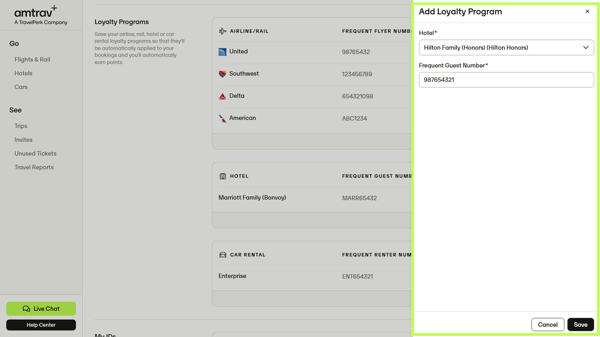
Step 3: Once you select the appropriate vendor and enter your loyalty program number, just click Save. Your loyalty number will now be automatically included in all future bookings for that airline, hotel, or car rental company.
Note: in order for your loyalty number to apply correctly, it must be entered correctly into AmTrav, and your name stored in AmTrav must match your name that the airline, hotel or car rental company has (if your name is John Doe or John F. Doe in AmTrav but American Airlines is looking for John Franklin Doe for your AAdvantage number, the AAdvantage number may not apply).
That's it! Have you added your secure flight information? If not, here's how to do that too.